

UI Design Case Study – Pet Health Management Mobile App Showcase
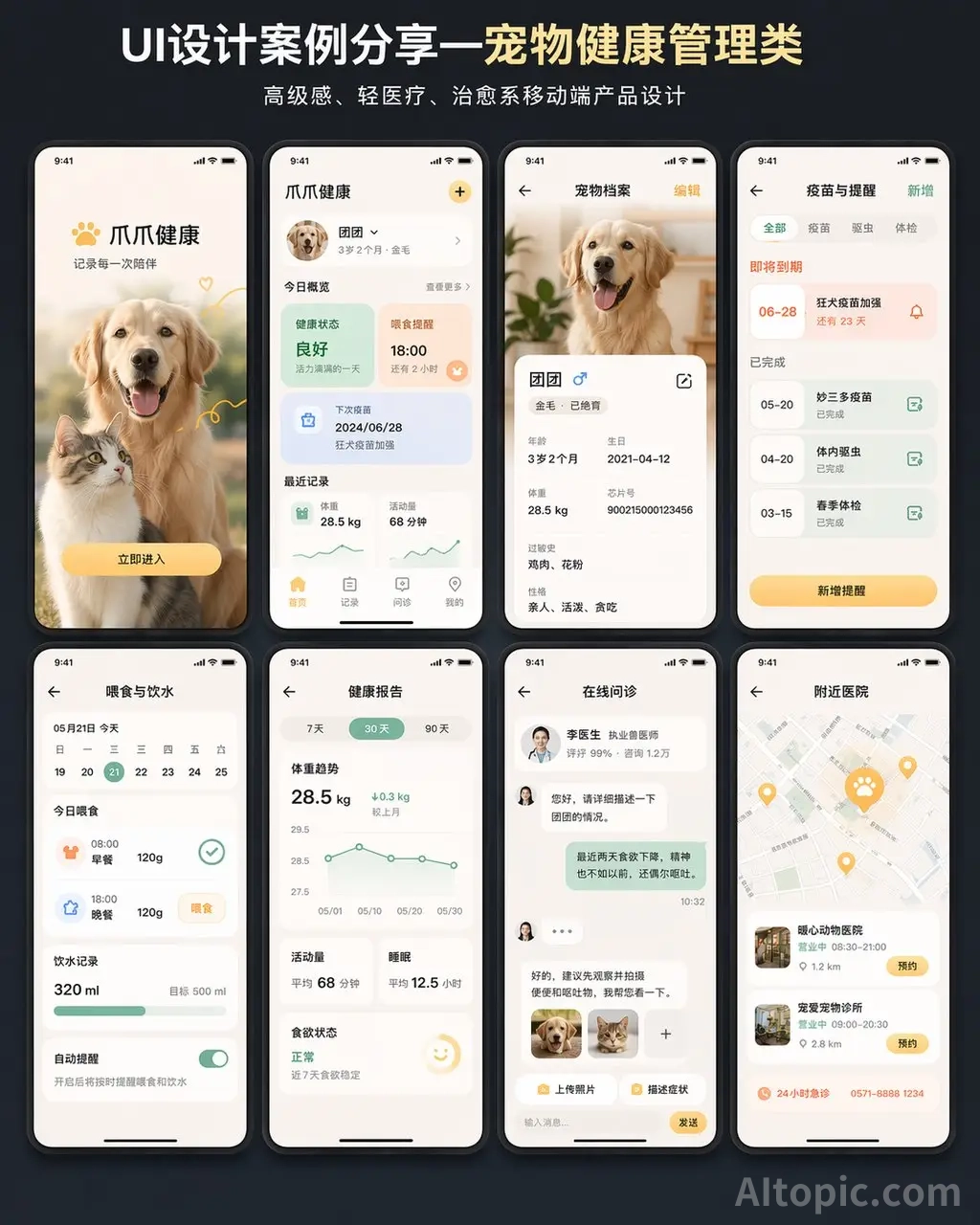
EN
English Prompt
A high-quality mobile UI design showcase poster, theme is "UI Design Case Study – Pet Health Management Category". The overall style strictly references outstanding pet app portfolio display images currently on the market: trending UI share images, popular pet product designs on Dribbble, premium app display boards on Behance. It must not look like a backend system style, not a hospital management interface, but an upscale mobile product design for "pet lifestyle + light health management".
Overall layout requirements:
Vertical 4:5 ratio display poster, deep charcoal gray background. A large Chinese title at the top, with 8 mobile phone interface mockups neatly arranged below. The entire composition should look like a complete set of UI work shared by a designer. The layout references pet UI case images: visually relaxed, cute but not childish, unified, with a strong commercial sense, suitable for social media/portfolio display.
Very important:
All mobile phone interfaces must strictly use the real long-screen phone ratio, close to the 19.5:9 ratio of iPhone 15/16. The screen proportion must be elongated, not short and fat, not resembling a webpage, not resembling a tablet. Every mobile phone screen content must maintain a fixed aspect ratio close to 9:19.5. The phone outer frames must be unified, with thin bezels, a realistic top status bar, and a natural bottom home bar. All phone proportions must be completely identical.
Overall visual style:
References the aesthetic direction of excellent pet UI design cases:
Large rounded corner cards
Clean and ample white space
Soft light-colored backgrounds
Partial high-saturation accents
Large pet images as the main visual
Combination of illustrations and real pet photos
Light, bright, and modern colors
No heavy medical feel, no complex charts or backend panels
Color system:
Primary colors are cream white, light apricot, peach orange, butter yellow, soft mint green, and light beige gray. The overall feel is warm, healing, cute, and premium. A small amount of bright orange or bright yellow is used for button accents. Avoid large areas of dark green medical style, avoid dull color schemes.
Title area requirements:
Only use Chinese at the top, no English main title, no designer credit, no text like "KIMI" or "DESIGN BY".
Main title:
UI Design Case Study — Pet Health Management
Subtitle optional:
Premium, Light Medical, Healing Mobile Product Design
Overall display structure:
8 mobile phone interfaces arranged in 4 on top and 4 on the bottom, with neat spacing. The phone sizes are all unified, but the content on each page must have rhythmic variation, and must not look like a copy-pasted template.
Product setting:
This is a pet health management app named "PawPaw Health", primarily serving cat and dog owners, helping to record pet health, remind about vaccinations, feeding, consultations, and nearby hospital information.
Although the theme is "health management", the UI expression style leans more towards a pet lifestyle product, with more affinity and market appeal like the reference images.
The 8 pages are as follows:
Splash screen
Large pet main visual, one dog and one cat, composition is cute but premium, page is simple.
Chinese copy:
PawPaw Health
Recording Every Moment of Companionship
Button:
Enter Now
Home page
Contains pet avatar, today's overview, feeding reminder, vaccination reminder, recent health data.
Page structure references excellent pet apps on the market: the upper half of the home page includes a welcome area and search/pet switching function, the middle features large cards, the lower part includes function entries and recommended content.
Chinese copy:
Today's Overview
Feeding Reminder
Next Vaccine
Health Status
Pet profile page
Centered on a large pet photo, cards below display information such as age, weight, breed, allergy history, birthday, etc.
Must not look like a hospital form page; should resemble a premium pet information card.
Chinese copy:
Pet Profile
Age
Weight
Breed
Allergy History
Vaccination reminder page
Use more visually appealing timeline cards or calendar reminder methods to display vaccination, deworming, and health check nodes.
The page must feel lightweight, not like a backend panel.
Chinese copy:
Vaccines & Reminders
Expiring Soon
Completed
Add Reminder
Feeding record page
Refer to lifestyle app layouts, using cuter cards and icons to display today's feeding, water intake, and time reminders.
Chinese copy:
Feeding & Hydration
Today's Feeding
Water Intake Record
Auto Reminder
Health report page
Use modern, simple, and minimal trend charts to display weight, activity level, sleep, and appetite.
Charts must be beautiful and lightweight, not complex medical backend charts.
Chinese copy:
Health Report
Weight Trend
Activity Level
Sleep
Appetite Status
Online consultation page
Use a modern chat interface, with veterinarian information at the top, chat history in the middle, and options at the bottom for "Upload Photo", "Describe Symptoms", and "Send".
Overall feel must be trustworthy but relaxed.
Chinese copy:
Online Consultation
Upload Photo
Describe Symptoms
Send
Nearby hospitals page
A small map in the upper section, a list of hospital cards in the lower section, including distance, business status, appointment button, and 24-hour emergency information.
Chinese copy:
Nearby Hospitals
Open Now
Appointment
24-Hour Emergency
Interface design requirements:
All text must be in Chinese
No English buttons, English navigation, or English page names
Icons must be simple, modern, and not childish
Pet images must maintain a unified style: realistic, cute, and clean
Pages must resemble excellent pet UI designs on the market: relaxed, marketable, healing, and shareable
Do not make every page look like a system form
Every page must have a clear main visual and hierarchical variation
Cards with large rounded corners, light shadows, bright white space, and strong visual breathing room
The overall style leans more towards a "trending UI share image" rather than a "corporate presentation board"
Final effect:
The entire image should look like a highly upvoted UI share work found on social media, with a unified style, comfortable colors, realistic and elongated phone proportions, beautiful interfaces, a modern feel, feasible for real implementation, and clearly exhibiting the premium aesthetic sense of excellent pet products on the market.
CN
Chinese Prompt
UI界面设计
一张高质量移动端 UI 设计展示海报,主题为“UI设计案例分享—宠物健康管理类”,整体风格严格参考当下市面上优秀的宠物类 App 作品集展示图:小红书爆款 UI 分享图、Dribbble 热门宠物产品设计、Behance 高级 App 展示板。不是后台系统风,不是医院管理端,而是“宠物生活方式 + 轻健康管理”的高级移动端产品设计。
整体版式要求:
竖版 4:5 展示海报,深炭灰背景,顶部是中文大标题,下面整齐排布 8 张手机界面 mockup,整体像设计师分享的一整套 UI 作品。排版参考宠物类 UI 案例图:视觉轻松、可爱但不低幼、统一、商业感强、适合小红书/作品集展示。
非常重要:
所有手机界面必须严格使用真实手机长屏比例,接近 iPhone 15 / 16 的 19.5:9 比例,屏幕比例细长,不能短胖,不能像网页,不能像平板。每个手机屏幕内容的宽高比固定接近 9:19.5,手机外框统一、细窄边框、顶部状态栏真实、底部 home bar 自然。所有手机比例完全一致。
整体视觉风格:
参考优秀宠物类 UI 设计案例的美学方向:
- 大面积圆角卡片
- 清爽留白
- 柔和浅色背景
- 局部高饱和点缀
- 大图宠物主视觉
- 插画与真实宠物照片结合
- 色彩轻盈、明快、现代
- 不做重医疗,不做复杂图表后台
颜色系统:
主色为奶油白、浅杏色、蜜桃橙、黄油黄、柔和薄荷绿、浅米灰,整体温暖、治愈、可爱、高级。少量用亮橙色或明黄色做按钮强调。避免大面积深绿医疗风,避免沉闷配色。
标题区要求:
顶部只使用中文,不出现英文主标题,不出现设计师署名,不要“KIMI”“DESIGN BY”这种字样。
主标题:
UI设计案例分享—宠物健康管理类
副标题可选:
高级感、轻医疗、治愈系移动端产品设计
整体展示结构:
8 张手机界面,采用 4 上 4 下排布,间距整齐,手机大小统一,但每一页内容要有节奏变化,不要像复制粘贴的模板。
产品设定:
这是一个宠物健康管理 App,名字叫“爪爪健康”,主要服务养猫养狗用户,帮助记录宠物健康、提醒疫苗、喂食、问诊和附近医院信息。
虽然主题是“健康管理”,但 UI 表达方式更偏宠物生活方式产品,要像参考图那样更有亲和力、更有市场吸引力。
8 个页面内容如下:
1. 启动页
大面积宠物主视觉,一只狗和一只猫,构图可爱但高级,页面简洁。
中文文案:
爪爪健康
记录每一次陪伴
按钮:
立即进入
2. 首页
有宠物头像、今日概览、喂食提醒、疫苗提醒、最近健康数据。
页面结构参考市面优秀宠物 App:首页上半部分为欢迎区和搜索/切换宠物,中部为大卡片,下部为功能入口和推荐内容。
中文文案:
今日概览
喂食提醒
下次疫苗
健康状态
3. 宠物档案页
以大宠物照片为核心,下面用卡片展示年龄、体重、品种、过敏史、生日等信息。
不要做成医院表单页,要更像高级宠物资料卡。
中文文案:
宠物档案
年龄
体重
品种
过敏史
4. 疫苗提醒页
用更好看的时间轴卡片或日历提醒方式展示疫苗、驱虫、体检节点。
页面要轻盈,不要后台感。
中文文案:
疫苗与提醒
即将到期
已完成
新增提醒
5. 喂食记录页
参考生活方式 App 的排法,用更可爱的卡片和图标展示今日喂食、饮水量、时间提醒。
中文文案:
喂食与饮水
今日喂食
饮水记录
自动提醒
6. 健康报告页
用现代、简洁、少量的趋势图展示体重、活动量、睡眠、食欲。
图表要漂亮、轻量,不要复杂医疗后台图。
中文文案:
健康报告
体重趋势
活动量
睡眠
食欲状态
7. 在线问诊页
使用现代聊天界面,顶部是兽医信息,中部是聊天记录,底部有“上传照片”“描述症状”“发送”。
整体要可信但轻松。
中文文案:
在线问诊
上传照片
描述症状
发送
8. 附近医院页
上半部分小地图,下半部分医院卡片列表,包含距离、营业状态、预约按钮、24小时急诊信息。
中文文案:
附近医院
正在营业
预约
24小时急诊
界面设计要求:
- 所有文字必须为中文
- 不出现英文按钮、英文导航、英文页面名
- 图标简洁、现代,不低幼
- 宠物图片统一风格,真实、可爱、清爽
- 页面要更像市面优秀宠物类 UI:轻松、市场化、治愈、可分享
- 不要把每个页面都做得太像系统表单
- 每个页面都要有清晰主视觉和层级变化
- 卡片大圆角、轻阴影、明亮留白、视觉呼吸感强
- 整体更偏“爆款 UI 分享图”而不是“企业汇报稿”
最终效果:
整张图看起来像小红书上高赞的 UI 分享作品,风格统一,色彩舒服,手机比例真实细长,界面美观、现代、可落地,有明显参考市面优秀宠物类产品设计的高级感。
这是一段AI生图的提示词,请帮我翻译成标准英文,所有中文全部翻译为英文不要出现中文字符(内容不要减少),主要给美国人使用,最后生成一行英文标题,生成一行英文的关键词,用,分割
Comments & Questions (0)
No comments yet
Be the first to comment!